

Australian mortgage teams face a daily maze: juggling client calls, chasing missing documents, and trying to keep everyone happy while staying compliant. The wrong tech means lost hours, frustrated staff, and brokers scrambling to fix errors just before settlement. Mortgage software isn’t just a shiny tool – it’s the difference between endless back-and-forth and a smooth, auditable process. If you’ve ever wondered which tech stack actually delivers (and which features are just buzzwords), you’re in the right place.
The Mortgage Tech Stack That Works for Australian Brokers
The best mortgage software stack for Australian teams combines a broker-focused CRM, workflow management, automation tools, digital signatures, and client portals. Look for solutions with strong integrations to banks, credit bureaus, and accounting systems. The right stack reduces manual work, improves compliance, and speeds up settlements – saving hours each week while keeping clients and regulators happy.
Why Mortgage Software Is Now Essential
A decade ago, most brokers worked from spreadsheets, email, and big paper files. Now, the pace of the market, changing compliance rules, and client expectations have forced a shift. If your tech can’t keep up, you’ll fall behind. Here’s why mortgage software is now a must:

-
ASIC and AFCA compliance: Regulators expect clear, auditable records. Paper trails just aren’t enough.
-
Faster settlements: Clients want approvals in days, not weeks. Manual processes waste precious time.
-
Remote work: Teams and clients are rarely in the same room. Digital processes keep things moving.
-
Security: Sensitive documents need secure, trackable storage – not someone’s email inbox.
Honestly, if your team is still relying on email chains and Excel, you’re probably spending double the time you need to on every file. That’s not sustainable.
Core Components of an Effective Mortgage Tech Stack
Let’s break down the must-have building blocks. Each part should talk to the others – no silos, no double entry.
CRM for Brokers
A CRM (Customer Relationship Management) system built for brokers is the heart of the stack. Generic CRMs like Salesforce or HubSpot can work, but you’ll spend months (and a fair bit of cash) customising them. Local mortgage CRMs – like Salestrekker, Mercury Nexus, or Podium – are designed for:
-
Tracking leads and applications
-
Storing ID, payslips, and compliance docs
-
Managing notes and reminders
-
Generating compliance reports (e.g., BID, NCCP)
-
Audit trails for every interaction
Don’t underestimate the value of a CRM that understands Australian lending quirks – like lender panels, commission splits, and credit policy triggers.
Workflow Management
This is where most teams either soar or stumble. Good workflow management tools let you:
-
Set up repeatable checklists for each loan type
-
Assign tasks to team members (think: credit checks, valuations, document requests)
-
Track file progress in real time
-
Flag bottlenecks early
Some CRMs have this built in, but standalone workflow tools (like Trello or Monday.com) can help smaller teams. Still, integration is king – manual updates between systems are a recipe for mistakes.
Automation Tools
If you’re still manually sending document request emails or reminders, you’re burning hours you’ll never get back. Automation tools can:
-
Trigger emails or SMS when a file hits a certain stage
-
Auto-populate lender forms from CRM data
-
Schedule follow-ups after settlement for annual reviews
-
Push compliance alerts if key steps are missed
Zapier, Integromat, or in-built automation in mortgage CRMs can handle most common processes. Just don’t over-automate; clients still want a human touch, especially on big decisions.
Digital Signatures
Wet signatures are fading fast. Most lenders now accept digital signatures that meet the requirements of the Electronic Transactions Act 1999 (Cth). Look for:
-
Platforms compliant with Australian law (DocuSign, Annature, Adobe Sign)
-
Audit logs for every signature
-
Integration with your CRM or document management system
This isn’t just about speed – it’s about having a provable, timestamped record if you’re ever audited.
Integrations
If your tools don’t talk to each other, your staff will end up copying data by hand – risking errors and wasting time. Key integrations include:
-
Lender application portals (ApplyOnline, NextGen)
-
Credit reporting agencies (Equifax, illion)
-
Accounting systems (Xero, MYOB)
-
Document storage (Google Drive, Dropbox)
Ask vendors about open APIs and whether you’ll need custom development. Closed systems can become a headache as your business grows.
Client Portals
Clients expect to upload documents, check progress, and ask questions online – without endless emails. Good client portals offer:
-
Secure upload/download for sensitive files
-
Real-time status updates
-
Chat or messaging for quick questions
-
Mobile-friendly design
This cuts down on lost attachments and keeps clients in the loop. If your portal is clunky or hard to access, clients will just call you instead – and everyone loses time.
How Compliance Fits Into the Mortgage Tech Stack
Mortgage broking in Australia is tightly regulated. Your tech stack must support, not hinder, compliance. Here’s what to watch for:
Regulatory Requirements
-
ASIC obligations: Under the National Consumer Credit Protection Act 2009 (NCCP), brokers must keep detailed records, provide BID (Best Interests Duty) disclosures, and store signed credit guides.
-
AFCA dispute resolution: If a client complains, you need a clear record of every step.
-
Privacy Act 1988 (Cth): Sensitive client data must be stored securely, with access logs.
Reporting and Audit Trails
Your system should let you:
-
Pull compliance reports (e.g., BID disclosures, credit proposal summaries) on demand
-
Show a complete audit trail for every loan file
-
Track who accessed or changed documents
If you’re ever audited, you’ll want these reports ready in minutes – not days.
Common Compliance Pitfalls
-
Relying on manual checklists (easy to skip steps)
-
Storing documents in personal email or local drives
-
Poor version control on key forms
-
Not capturing digital consent properly
A good mortgage software stack builds compliance into daily workflows, so it’s almost impossible to miss a step.
Comparing Top Mortgage Software Solutions in Australia
There’s no one-size-fits-all answer, but some platforms are clear standouts for local brokers. Here’s a quick comparison of popular systems (as of 2024):
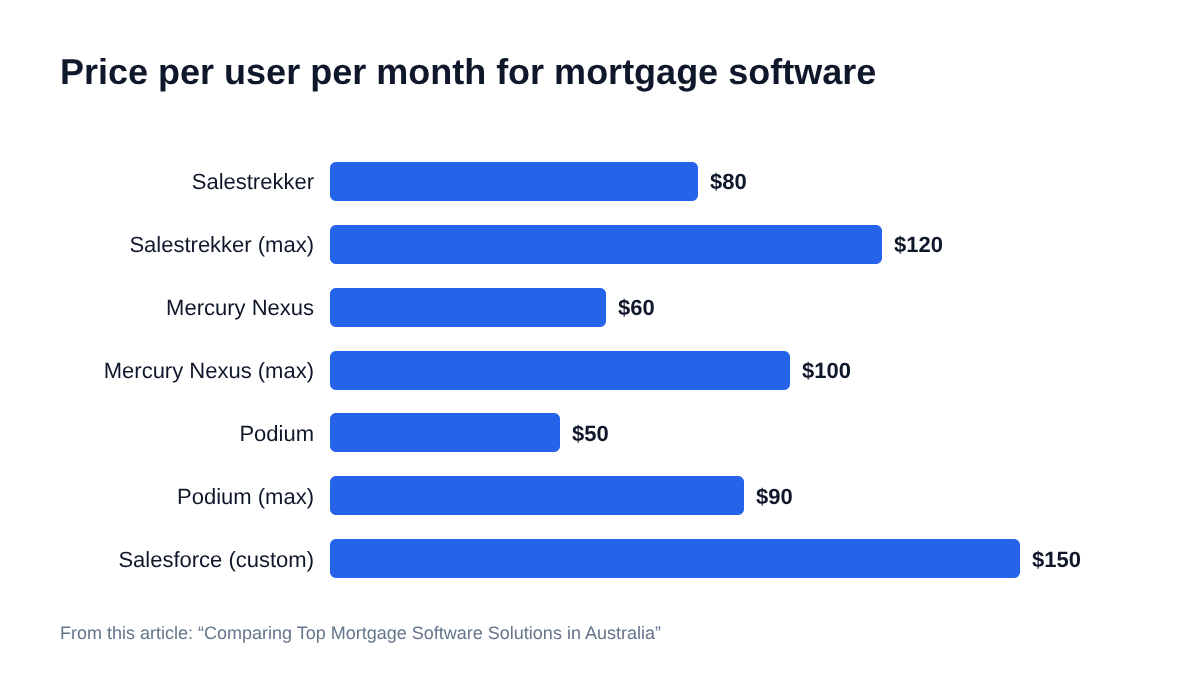
FeatureSalestrekkerMercury NexusPodiumSalesforce (custom)Broker CRMYesYesYesYes (custom)Workflow ManagementYesYesYesYes (custom)Automation ToolsYes (built-in)LimitedBasicYes (custom)Digital SignaturesYes (Annature)YesYesAdd-onClient PortalYesYesYesAdd-onBank IntegrationsYes (ApplyOnline)Yes (ApplyOnline)YesNeeds configPrice (per user/mo)$80 – $120$60 – $100$50 – $90$150+Local SupportYesYesYesNo
Note: Prices are indicative and may change. Always confirm with the vendor.
What to Look For (and What to Skip)
-
Choose software with local compliance support – Australian regulations change often.
-
Avoid tools that require lots of manual data entry or lack integrations.
-
Don’t get distracted by fancy dashboards if the basics (CRM, workflow, compliance) aren’t strong.
How to Build or Upgrade Your Mortgage Tech Stack
Switching systems or starting from scratch can feel daunting. Here’s a process that works for most small to mid-sized brokerages:
-
Map your current process: Write down every step, from lead to settlement. Where are the bottlenecks?
-
List your must-haves: Compliance, reporting, client communication, integrations, digital signatures.
-
Shortlist vendors: Ask for demos and real-life references from similar-sized firms.
-
Test integrations: Don’t trust vendor promises – ask to see live integrations with your key platforms.
-
Plan migration: Set aside time for data cleaning and staff training. Most teams underestimate this stage.
-
Monitor post-launch: Assign someone to collect feedback and track issues for at least three months.
Practical Scenarios: Mortgage Software In Action
Let’s look at three common situations where the right tech stack makes a measurable difference.
Scenario 1: A First-Home Buyer With a Tight Deadline
-
Broker receives a lead through their website.
-
CRM auto-creates a new file and sends a document request via the client portal.
-
Client uploads payslips and ID directly; broker reviews and pushes to ApplyOnline.
-
Digital signatures collected on BID and credit guide.
-
Workflow flags missing documents; automation sends reminders.
-
All compliance records stored with timestamps for audit.
Result: File submitted in three days, no missing paperwork, and a happy client.
Scenario 2: Annual Compliance Review
-
Principal broker pulls a report of all files settled in the past year.
-
System checks that all required disclosures, digital signatures, and compliance notes are present.
-
Any gaps are flagged for follow-up.
Result: ASIC audit readiness in under an hour, not a week.
Scenario 3: Dispute With a Client
-
Client claims they never received a credit proposal.
-
Broker pulls the audit trail from the CRM, showing email delivery, open timestamp, and digital signature.
-
Dispute resolved without escalation to AFCA.
Result: Clear, defensible compliance – no lost sleep.
Key Features to Prioritise for Australian Brokers
Not every feature is worth the extra cost. Here’s what actually matters:

-
BID workflow integration: Ensures you never miss a Best Interests Duty step.
-
Open API: Allows future integrations as your business grows.
-
Real-time compliance alerts: Flags missing documents or overdue tasks.
-
Mobile access: Lets brokers update files in the field.
-
Customisable reporting: Supports ASIC and lender reporting without manual work.
If a system can’t check these boxes, think twice.
Risks and Limitations of Mortgage Software
No tech is perfect. Even the best mortgage software has limits:
-
Upfront costs: Implementation and training can be expensive, especially for larger teams.
-
Change management: Staff may resist new systems or skip steps if not trained well.
-
Integration gaps: Some lenders or credit bureaus may not support direct integration.
-
Data security: While most vendors encrypt data, you’re still responsible for access controls and breach reporting under the Privacy Act.
-
Vendor lock-in: Hard to switch if your data is stored in a proprietary format.
Always ask about export options, disaster recovery, and compliance certifications (like ISO 27001).
Integrating Mortgage Software With Accounting and Reporting
Mortgage businesses must manage commissions, GST, and other accounting needs. The best mortgage software makes this easier:
-
Commission tracking: Calculate split payments, clawbacks, and GST on commissions.
-
Xero/MYOB integration: Export invoices and expenses directly, reducing manual entry.
-
BAS and GST compliance: Tag income and expenses by type for easier Business Activity Statement preparation.
-
Audit-ready records: Keep digital trails for income, expenses, and bank reconciliations.
If you’re reporting under Australian Accounting Standards (AASB/IFRS), make sure your system can export detailed transaction logs for your accountant or auditor.
Data Security, Privacy, and Recordkeeping
Handling sensitive personal and financial data brings serious responsibilities under Australian law.
Privacy Act 1988 (Cth) and OAIC Guidance
-
Only collect data required for the loan process.
-
Store data using encrypted, access-controlled systems.
-
Keep audit logs showing who accessed or changed files.
-
Respond to data breach notifications within 30 days.
Record Retention
-
NCCP Act requires keeping records for at least 7 years after the loan is settled or closed.
-
This includes client communications, signed forms, and compliance notes.
-
Digital records must be accessible and readable for the full retention period.
Ask vendors about their compliance with ISO 27001, SOC 2, and local data storage (ideally, data should be hosted in Australia).
Choosing Between Cloud and On-Premises Solutions
Most Australian brokers now use cloud-based mortgage software. Here’s why:
-
Lower IT costs: No server maintenance or upgrades
-
Access anywhere: Work from home, office, or on-site
-
Automatic updates: Always have the latest compliance features
-
Disaster recovery: Backups managed by the vendor
Some larger aggregators or banks still use on-premises systems for extra control, but for most independent brokerages, cloud is the way to go. Just double-check where your data is hosted and how backups are managed.
Frequently Asked Questions
What is mortgage software and why do brokers need it?
Mortgage software is a suite of digital tools that help brokers manage loan applications, compliance, client communications, and document storage. Australian brokers need it to handle complex workflows, meet regulatory requirements, reduce manual errors, and deliver faster, more secure service to clients.
Which features should an Australian mortgage broker prioritise?
Brokers should look for a CRM tailored to local compliance, workflow management, digital signature support, client portals, and integrations with key platforms like ApplyOnline, Xero, and credit bureaus. Real-time compliance alerts and audit trails are also essential.
How does mortgage software support regulatory compliance?
Mortgage software helps brokers meet ASIC and NCCP obligations by automatically generating required disclosures, tracking BID steps, storing signed documents, and maintaining detailed audit logs. This ensures brokers can quickly produce records during audits or disputes.
Can mortgage software integrate with accounting systems like Xero or MYOB?
Yes, most leading mortgage software platforms offer direct integration with Xero, MYOB, or QuickBooks. This allows brokers to sync commissions, expenses, and GST data for accurate financial reporting and BAS preparation.
What are the risks of not using integrated mortgage software?
Without integrated software, brokers face higher risks of manual errors, missed compliance steps, lost documents, and slower settlements. This can lead to regulatory penalties, unhappy clients, and lost business opportunities.
How do digital signatures work in mortgage software?
Digital signature platforms like DocuSign or Annature allow clients and brokers to sign documents electronically. These signatures are legally valid under the Electronic Transactions Act 1999 (Cth) if audit trails and consent are captured. Most mortgage software integrates with these tools for a secure, trackable process.
How long must brokers keep client and loan records?
Under the NCCP Act, brokers must retain client and loan records for at least 7 years after the loan is settled or closed. Digital records must remain accessible and readable for the full period.
Are cloud-based mortgage systems secure enough for sensitive data?
Most reputable cloud vendors encrypt data in transit and at rest, comply with ISO 27001 or SOC 2, and offer Australian data hosting. Brokers should still enforce strong password policies and review access controls regularly.
What is a client portal and how does it benefit mortgage brokers?
A client portal is a secure online platform where clients can upload documents, check loan progress, and communicate with their broker. This reduces email clutter, speeds up the process, and improves client satisfaction.
How can mortgage software help with commission and GST tracking?
Mortgage software can track commission splits, calculate GST on income, flag clawbacks, and export data to accounting systems. This simplifies BAS reporting and ensures accurate financial records.
What happens if my mortgage software vendor shuts down or I want to switch?
Before choosing a vendor, confirm you can export all your data in a common format (CSV, PDF, XML). Some vendors offer migration support. Always back up key documents and records regularly.
Do I need an IT team to set up mortgage software for my brokerage?
Most cloud-based mortgage software is designed for non-technical users, with setup and training included. Complex integrations may require IT support, but small to mid-sized teams can usually manage with vendor help.
What to Prepare Before You Upgrade Your Tech Stack
Before you change systems, get your house in order. Clean up old records, decide who will own the migration process, and set clear expectations with your team. It’s worth spending a bit more time upfront to avoid messy transitions and compliance headaches later.
The right mortgage software stack isn’t just a nice-to-have anymore. For Australian brokers, it’s the backbone of a secure, efficient, and compliant business. Choose carefully and review your stack every two years – regulations and client expectations won’t wait for you to catch up.